YouTube has become one of the most popular platforms for sharing videos, entertainment, education and business content. Millions of creators use it to connect with audiences, promote their brands and earn money through video content. However, creating videos is only one part of running a successful YouTube channel. Creators also need a reliable platform to manage uploads, monitor performance, interact with viewers and understand their audience.
This is where YT Studio becomes useful. It is the official channel management platform provided by YouTube that allows creators to control different aspects of their channels from one dashboard.
Whether you are a beginner starting your first channel or an experienced creator managing thousands of subscribers, understanding its features can help you improve your content strategy. You can upload videos, edit descriptions, manage comments, check analytics, monitor monetization eligibility and discover opportunities to grow your audience.
In this comprehensive guide, we will explain the main features, benefits, tools and functions of the platform. You will also learn how to use it effectively, improve video performance and manage your channel professionally.
What Is YT Studio?
YT Studio, commonly known as YouTube Studio, is an official platform designed to help content creators manage and monitor their YouTube channels.
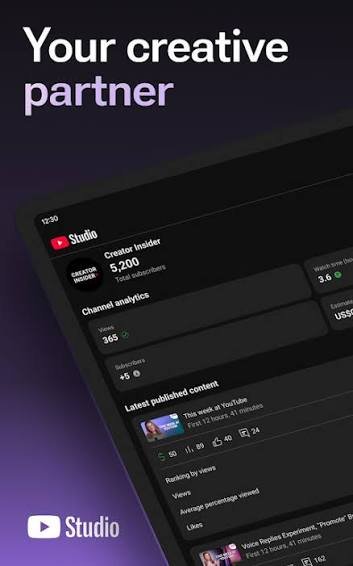
It provides a central dashboard where users can upload videos, organize content, respond to comments, check audience engagement and review channel statistics.
Creators can access the platform through a desktop web browser or the official YouTube Studio mobile application.
The platform is especially useful because it provides detailed information about how viewers interact with published videos. Creators can understand which videos receive more views, how long people watch their content and where their audience comes from.
Some important functions include:
Video uploading and management.
Channel customization.
Audience analytics.
Comment moderation.
Copyright management.
Monetization monitoring.
Playlist organization.
Video editing details and settings.
Performance tracking.
These tools make channel management easier and help creators make informed decisions about their content.
How to Access YT Studio
Accessing your creator dashboard is simple. You only need a Google account connected to your YouTube channel.
Follow these steps to open the platform.
Step 1: Open YouTube
Visit the official YouTube website using your computer or mobile browser.
Step 2: Sign In to Your Account
Click the sign-in option and enter the Google account connected to your channel.
Step 3: Open Your Profile Menu
Click your profile picture in the upper-right corner of the screen.
Step 4: Select YouTube Studio
Choose the YouTube Studio option from the available menu.
Step 5: Explore Your Dashboard
After opening the dashboard, you can access different tools from the navigation menu.
You will find sections for content, analytics, comments, subtitles, copyright, monetization and channel customization, depending on your account and eligibility.
You can also directly visit the official website:
Important Features of YT Studio
The platform includes several useful tools that help creators manage their channels efficiently. Understanding these features can improve your workflow and save time.
1. Channel Dashboard
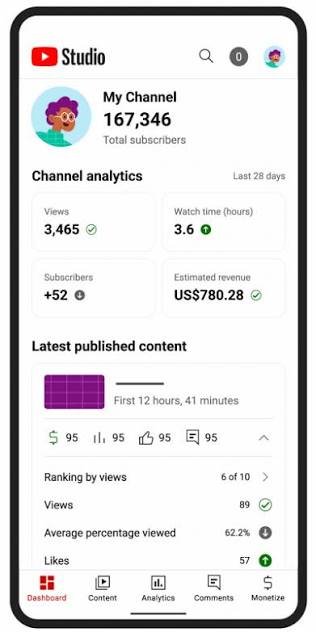
The dashboard is the main screen that appears when you open your creator account.
It provides an overview of your channel’s recent activity and important performance information.
You may find:
Recent video performance.
Channel views.
Subscriber information.
Latest comments.
Important notifications.
YouTube recommendations and updates.
The dashboard helps creators understand what is happening on their channels without opening every individual section.
2. Video Management
Video management is one of the most important features for content creators.
Through the content section, users can organize and manage their uploaded videos, Shorts and live streams.
You can perform several tasks, including:
Upload new videos.
Edit video titles.
Update descriptions.


3. YouTube Analytics
Analytics is an essential feature for understanding channel performance.
It provides information about how viewers discover and watch your videos.
Important analytical metrics include:
Views: Shows how many times your content has been viewed according to YouTube’s counting system.
Watch Time: Measures the amount of time viewers spend watching your content.
Subscribers: Shows how your subscriber count changes over time.
Impressions: Measures how often your video thumbnails are shown to viewers on eligible YouTube surfaces.
Click-Through Rate (CTR): Shows the percentage of eligible thumbnail impressions that resulted in a video view.
Audience Retention: Helps you understand which parts of your videos keep viewers interested and where they stop watching.
By studying these metrics, creators can identify successful content and improve future videos.
4. Comment Management
Interacting with viewers is an important part of building a successful channel.
The comments section allows creators to read messages, respond to questions and moderate discussions.
You can:
Reply to viewer comments.
Like or react to comments.
Remove inappropriate messages.
Hide users from your channel.
Report spam.
Review comments held for moderation.
Responding to genuine comments can encourage meaningful conversations and help build a stronger community.
5. Channel Customization
A professional channel appearance can make a positive impression on new visitors.
The customization section allows creators to improve their channel layout and branding.
You can customize elements such as:
Channel profile picture.
Banner image.
Channel description.
Featured sections.
Video trailers.
Featured content.
Consistent branding helps viewers recognize your channel and understand the type of content you publish.
6. Monetization Tools
Many creators use YouTube to earn income through their content.
The monetization section helps eligible creators review their YouTube Partner Program status and access available earning features.
Depending on eligibility, location and current program policies, monetization options may include:
Advertising revenue sharing.
Channel memberships.
Super Chat.
Super Stickers.
Super Thanks.
YouTube Shopping features.
Creators should review the official YouTube Partner Program requirements because eligibility rules and available features can change.
7. Copyright Management
Copyright protection is important for anyone publishing videos online.
The copyright section helps creators review certain copyright-related issues and available actions.
You may be able to review copyright removal requests and other copyright information depending on your channel and account access.
Always use original content or properly licensed music, videos and images. Avoid uploading copyrighted material without permission.
How to Upload Videos Using YT Studio
Uploading videos is one of the basic activities of running a YouTube channel.
The platform provides a straightforward process for publishing new content.
Step 1: Open the Content Section
Sign in to your creator dashboard and select the content option.
Step 2: Click Create
Select the Create button and choose the video upload option.
Step 3: Select Your Video
Choose the video file from your computer.
Step 4: Add Video Details
Enter an informative title and description that accurately represent your content.
Step 5: Upload a Thumbnail
Select an attractive and relevant thumbnail to encourage viewers to explore your video.
Step 6: Add Additional Information
Depending on your video, you can add subtitles, playlists, tags and other relevant details.
Step 7: Complete the Required Checks
Review copyright and other applicable checks before publishing.
Step 8: Select Visibility
Choose whether your video should be public, private or unlisted. You may also schedule a public release.
Step 9: Publish Your Video
Review all details and publish your content when everything is ready.
Following these steps helps maintain an organized publishing process.
How to Use YT Studio for YouTube SEO
Search engine optimization plays an important role in helping videos reach the right audience.
Although optimizing a video does not guarantee higher rankings, it can improve how clearly YouTube understands your content and how effectively it attracts interested viewers.
Here are some useful SEO practices.
1. Use Relevant Keywords in Titles
Create clear and descriptive video titles that explain what viewers can expect.
For example, if your video is about cooking, use a title that describes the recipe rather than a vague heading.
Include your main keyword naturally without unnecessary repetition.
2. Write Informative Descriptions
Video descriptions provide additional context about your content.
Explain what the video covers and include relevant keywords naturally.
You can also add useful links, timestamps and related resources where appropriate.
3. Create Attractive Thumbnails
Thumbnails are important because they help viewers decide whether to click on a video.
Use clear images, readable text and consistent branding.
Avoid misleading thumbnails that do not match the actual video.
4. Organize Videos into Playlists
Playlists group related videos together and make it easier for viewers to explore your content.
For example, an educational channel can create separate playlists for English grammar, mathematics and computer lessons.
5. Add Accurate Subtitles
Subtitles can make videos more accessible to viewers and help people understand spoken content.
Check automatic captions for spelling and accuracy, especially when using multiple languages.
6. Study Audience Retention
Review audience retention reports to understand how viewers respond to your videos.
If many viewers leave during the introduction, consider making future openings more engaging and direct.
7. Review Search Traffic
Use analytics to understand which YouTube search terms bring viewers to your videos.
This information can help you identify topics that are relevant to your audience.
Benefits of Using YT Studio
The platform offers several advantages for both new and experienced creators.
Easy Channel Management
Creators can manage most important channel activities from one location rather than using multiple separate tools.
Better Performance Understanding
Analytics provide useful information about views, engagement, watch time and audience behaviour.
Improved Content Planning
Performance reports help creators understand which topics are receiving attention and plan future videos accordingly.
Audience Interaction
Comment management makes it easier to communicate with subscribers and respond to their questions.
Monetization Monitoring
Eligible creators can monitor their earning features and Partner Program information.
Convenient Mobile Access
The official mobile application allows creators to check important channel information and perform supported management tasks while away from their computers.
YT Studio on Mobile vs Desktop
Creators can access YouTube Studio through both mobile and desktop devices. However, the experience and available tools may differ.
| Feature | Mobile App | Desktop Version |
|---|---|---|
| View analytics | Yes | Yes |
| Check comments | Yes | Yes |
| Monitor subscribers | Yes | Yes |
| Manage video details | Yes | Yes |
| Upload videos | Supported | Supported |
| Detailed channel management | Some limitations | More comprehensive |
| Advanced content organization | Varies | More options |
The desktop version is generally more convenient for detailed channel management, extensive analytics reviews and content organization.
Creators can use both versions according to their needs.
Common Problems in YT Studio and Their Solutions
Sometimes creators experience technical problems while managing their channels. Most common issues can be resolved by following simple troubleshooting steps.
1. Dashboard Not Loading
If the dashboard does not load, check your internet connection and refresh the browser.
You can also try another supported browser or clear your browser cache.
2. Video Upload Failure
Upload problems may occur because of unstable internet connections, unsupported file formats or temporary technical issues.
Check the video format, file size and internet connection before trying again.
3. Analytics Not Updating
Some performance information may take time to appear because YouTube processes and verifies data.
Allow sufficient time for reports to update before assuming something is wrong.
4. Comments Not Appearing
Comments may be held for review, removed as spam or restricted by moderation settings.
Check your comment moderation options and held-for-review section.
5. Monetization Not Available
Monetization features depend on channel eligibility, location and YouTube policies.
Visit the monetization section to review your current status and any requirements you still need to meet.
Best Tips for Growing Your YouTube Channel
Managing a channel is only one part of becoming a successful creator. Consistency, audience understanding and content quality are also important.
Follow these practical tips:
Publish consistently: Create a realistic upload schedule and follow it.
Understand your audience: Research the interests and needs of your viewers.
Improve video quality: Focus on clear audio, good lighting and useful information.
Create engaging introductions: Explain the value of your video within the opening moments.
Use relevant thumbnails: Design attractive images that accurately represent your content.
Study analytics: Review performance reports to identify areas for improvement.
Interact with viewers: Respond to questions and encourage meaningful discussions.
Experiment with content: Test different topics and formats to discover what your audience enjoys.
Follow YouTube policies: Avoid misleading metadata, spam and copyright violations.
Improve gradually: Use your performance data to make better decisions with every upload.
By combining these practices with the tools available in YT Studio, creators can develop a more organized and effective content strategy.
Frequently Asked Questions (FAQs)
1. What is YT Studio used for?
YT Studio is used to manage YouTube channels. It allows creators to upload videos, monitor analytics, manage comments, customize channels and review monetization information.
2. Is YouTube Studio free to use?
Yes. YouTube Studio is a free platform provided by YouTube for channel owners and authorized managers.
3. Can beginners use YT Studio?
Yes. Beginners can use the platform to upload their first videos, manage channel settings and understand their audience performance.
4. Can I use YouTube Studio on my mobile phone?
Yes. The official YouTube Studio mobile application is available for supported Android and iOS devices.
5. How can I check video views?
Open the analytics section or select an individual video from the content section to review its available performance statistics.
6. Can I edit video titles after uploading?
Yes. You can update video titles and descriptions through the content management section.
7. Does YT Studio help with YouTube SEO?
Yes. It provides tools and performance information that can support video optimization, including titles, descriptions, subtitles and analytics.
8. Can I manage comments through YouTube Studio?
Yes. Creators can review comments, reply to viewers and use available moderation tools.
9. How can I check my monetization status?
Open the Earn or monetization section to review your channel’s eligibility and available earning features.
10. Is YouTube Studio different from YouTube?
Yes. YouTube is the platform where people watch and share videos, while YouTube Studio is the creator management platform used to manage channels and review performance.
Conclusion
YouTube has created many opportunities for individuals, businesses and organizations to share information and reach global audiences. However, managing a successful channel requires more than simply uploading videos. Creators need to understand their audience, monitor performance and continuously improve their content.
YT Studio provides the tools needed to manage these activities from a central dashboard. From video uploading and analytics to comment moderation and monetization monitoring, it makes channel management more convenient.
Whether you are a beginner or an experienced content creator, learning how to use its features can help you organize your work and make informed decisions.
Start exploring the available tools, review your channel performance regularly and focus on publishing valuable content. With consistency, creativity and a clear strategy, you can build a stronger YouTube presence over time.